An UpCode product / A closer look
The Social Scheduler
AI content creation, media editing, and a publishing calendar in one workspace.
A useful website needs a clear offer and a usable mobile experience. It also needs content that brings people to it. Explore how The Social Scheduler helps prepare social posts, blog drafts, email content, and media—and how those workflows connect to the website visitors reach next.
Published by Mobilify It, built by UpCode Studios—the team also behind The Social Scheduler (SALT Social Media). This is a first-party product showcase, not an independent review. Workflow examples are illustrative; no customer results are claimed.
Create with context
Start with a website URL or a brief. Add your audience, offer, brand voice, and visual direction before reviewing the generated drafts.
Refine the media
Use Photo Studio for crops and editable compositions, or Video Studio to review and refine a reel before rendering and applying it.
Review, then schedule
Prepare the destination, review copy and media, and choose posting times. Publishing depends on supported channels and account permissions.
Five product workflow studies
See the work, not just the promise.
Each walkthrough covers the starting problem, the product’s documented tools, a practical sequence, and the checks a business owner still needs to make.
01 / Content creation
From a business idea to reviewable AI content
A practical look at The Social Scheduler’s brief-to-draft workflow: website context, brand direction, editable content, and human review.
Read the workflow study02 / Planning & scheduling
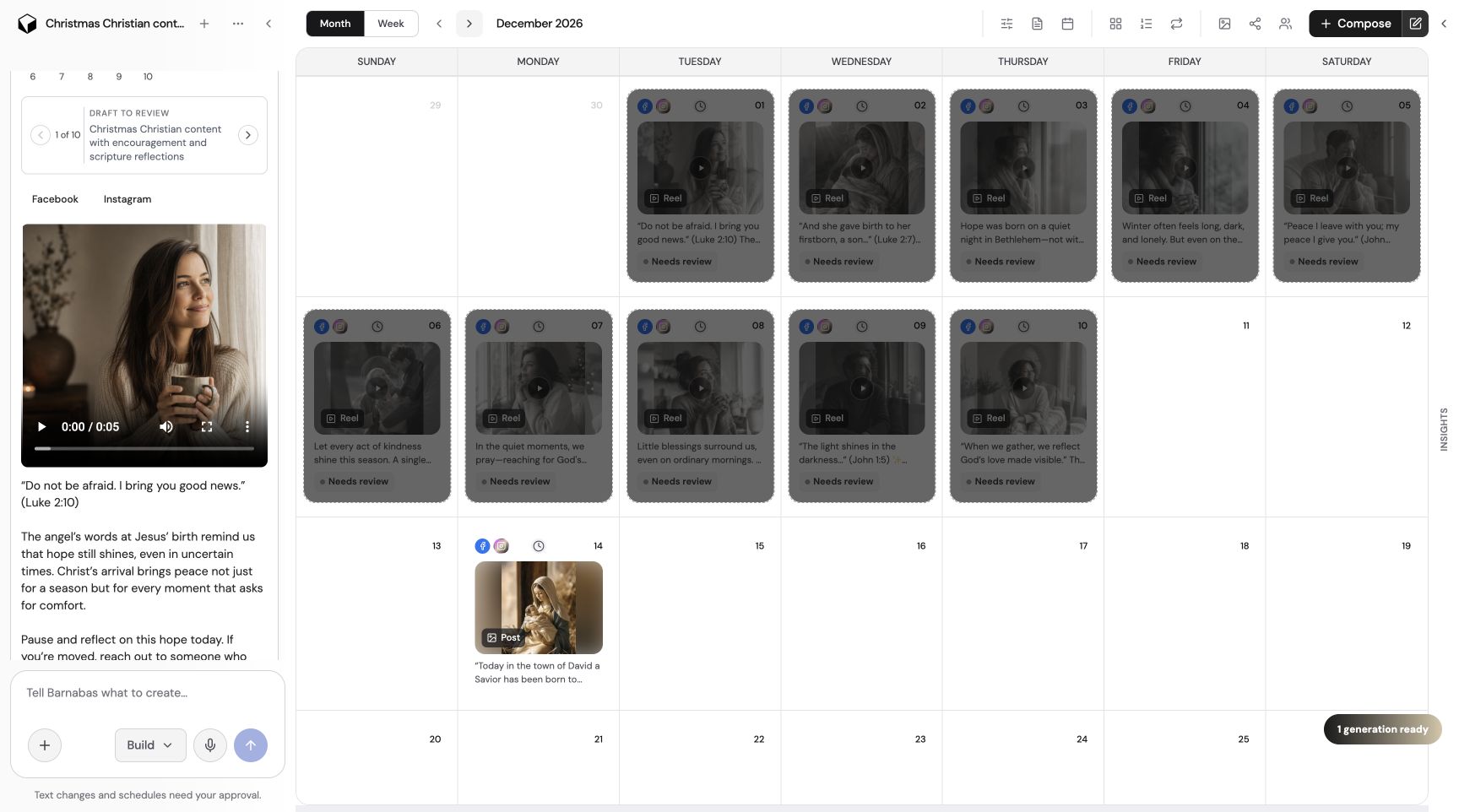
Planning a content calendar without losing the review step
Explore The Social Scheduler’s calendar, batch review, channel-specific posting times, and the checks that belong before scheduling.
Read the workflow study03 / Photo Studio
Preparing branded social images in Photo Studio
A product walkthrough of The Social Scheduler’s Photo Studio: crop, editable layers, brand assets, and reviewing a social image before saving.
Read the workflow study04 / Video Studio
Reviewing and refining a social reel in Video Studio
See how The Social Scheduler separates reel preview, timeline editing, rendering, and applying a finished video to a post.
Read the workflow study05 / Website & publishing
Connecting website content, social posts, and publishing destinations
How The Social Scheduler connects content drafts with supported social, blog, and email destinations—and where mobile website checks still matter.
Read the workflow studyWhat this showcase does—and does not—prove
The screenshots come from the product project, and the workflows reference its public documentation. That demonstrates a concrete product and its described capabilities. It does not establish time savings, customer growth, search rankings, or a measured return on investment.
A customer case study needs permission, a documented starting point, a clear account of the work, and verifiable results. These pages are intentionally product studies until that evidence exists. Supported integrations, pricing, credits, and account requirements should be checked on the product’s current website.
The next click still needs to work on a phone.
The Social Scheduler helps with content preparation and publishing. Mobilify It helps you identify mobile website problems and request a custom redesign. Neither a scheduled post nor a content draft fixes a website’s layout automatically.