02 / Planning & scheduling
Planning a content calendar without losing the review step
How can a small team plan ahead without publishing unchecked content?
Published by Mobilify It, built by UpCode Studios—the team also behind The Social Scheduler (SALT Social Media). This is a first-party product showcase, not an independent review. Workflow examples are illustrative; no customer results are claimed.
A calendar is useful when it shows more than dates. A team needs to know what a post says, where it will appear, and whether it has been reviewed. The Social Scheduler combines content planning and draft review in one workspace. Here is a practical way to use that structure without confusing a plan with a completed publication.
The starting problem: a spreadsheet is not a publishing status
In an illustrative small-team workflow, a spreadsheet contains the campaign schedule while captions and images live elsewhere. A date in that spreadsheet does not tell everyone whether the media is finished or whether the right account has been selected.
The goal is not to fill every day with content. It is to make the next week understandable: which messages support the business objective, which drafts need work, and which items are actually ready to schedule.
What the product makes visible
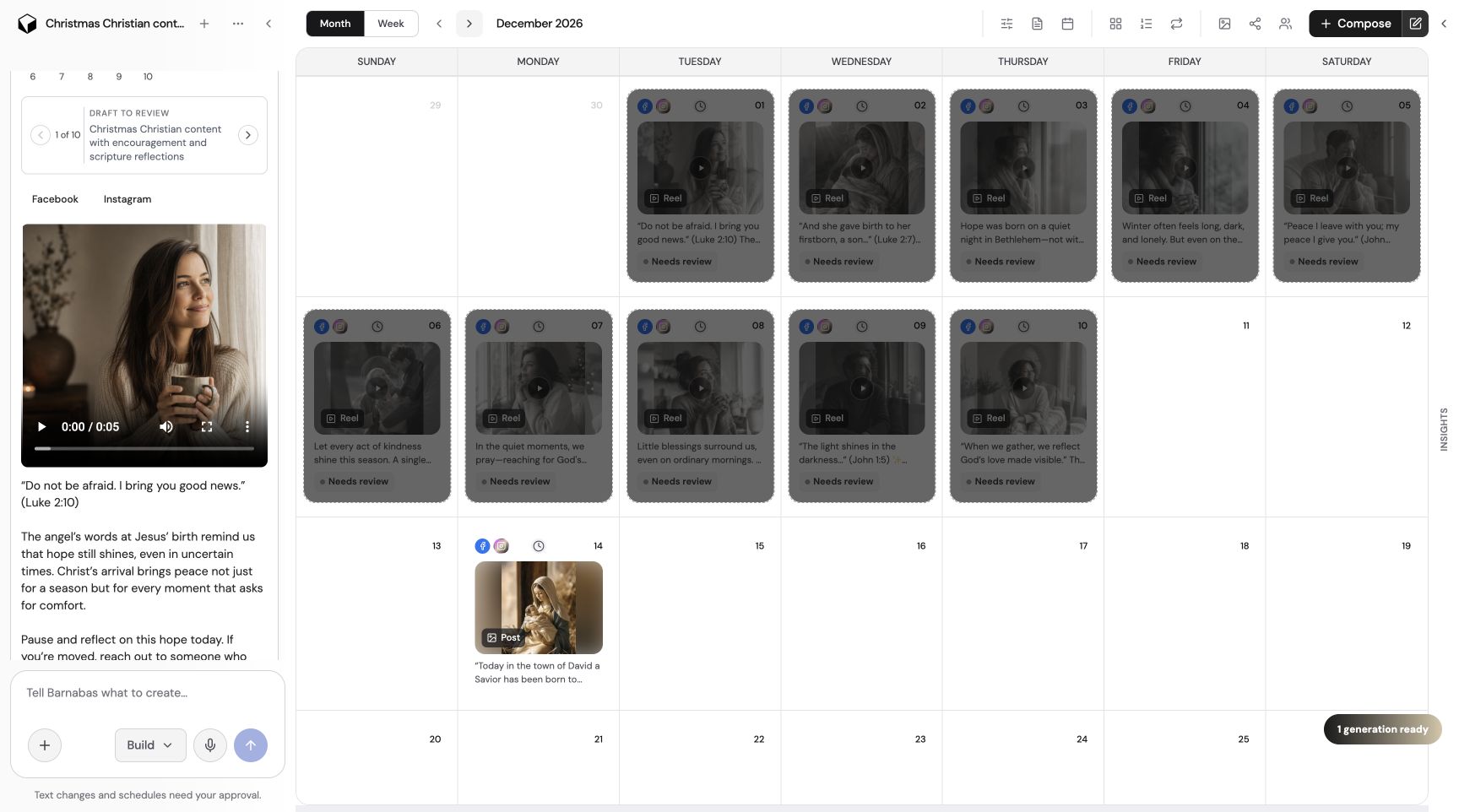
The product’s public FAQ describes batches of drafts that can be reviewed and scheduled individually or together. Its calendar allows posting-time adjustments, including separate times for supported social platforms. Recurring schedules can support an ongoing series.
The product screenshot shows a month view alongside a review panel, with example content marked ‘Needs review.’ That image demonstrates the interface. It does not establish a customer’s posting volume, time saved, or engagement results.
Build the calendar around a campaign, not empty slots
Start with a small set of themes: one useful explanation, one specific offer, and one answer to a common question. Prepare drafts, check their destinations, and place them across the intended period. Leave room for timely updates rather than locking every slot in advance.
Review each destination account and its format requirements. The same message may need different copy, framing, or timing on another platform. Availability depends on the channel, supported format, and account permissions; a connected account is not a promise that every publishing option is available.
Separate approval, scheduling, and publication
Review the text and media before scheduling. Confirm the posting date, timezone, destination, and approval requirements. For recurring content, decide how it will be refreshed so an old offer does not continue appearing after the business has changed it.
After a scheduled time passes, check the publishing activity and the destination itself. A planned item, a scheduled item, and a live post are different states. Never report a campaign as delivered just because its calendar has been populated.
How to evaluate a real rollout
A useful evaluation would record how many drafts were approved, how many required corrections, whether scheduled items reached the correct account, and how often the calendar needed intervention. Compare equivalent periods and note any changes in campaign scope.
For Mobilify It readers, the destination matters too. Check the booking or enquiry page on a phone before the campaign begins. A consistent schedule cannot compensate for an unusable form or an offer that is difficult to find on mobile.
Before you put this workflow into use
- Confirm account, timezone, format, and posting date.
- Approve copy and media before scheduling.
- Review recurring offers for expiry and accuracy.
- Verify publication rather than relying on a calendar entry.
Product sources and disclosure
This first-party walkthrough was prepared from the product’s public documentation and project screenshots, reviewed November 14, 2026. Example scenarios are illustrative, not reported customer outcomes. Consult current documentation for availability and limits.
The Social Scheduler’s scheduler overview